CHAPTER 3
The mathematical description of the influent wastewater that is fed to the plant model is the single most important aspect of a simulated system. Without significant consideration of the influent characterization, the plant model will be limited in its ability to predict the dynamic behavior of the plant. Hydromantis/Hatch has developed a tool called Influent Advisor to help users navigate the influent models and achieve the influent characterization most consistent with the available measured data.
The influent model is dependent on the choice of a biological model chosen for the downstream processes. The reason for this is that the downstream biological models use different sets of state variables. GPS-X automatically determines which biological model has been chosen in the downstream processes and selects the appropriate influent model. This approach ensures that the influent data entered by the user is partitioned correctly. For instance, if a user is using ASM1 in a downstream biological process, then it is important that any biodegradable soluble COD be assigned to the ss state variable. Alternatively, if the user is using ASM2d (in which ss is not a state variable), then it is important that soluble substrate be assigned to sf or slf and not ss.
The influent advisor interface is shown in Figure 3‑1.
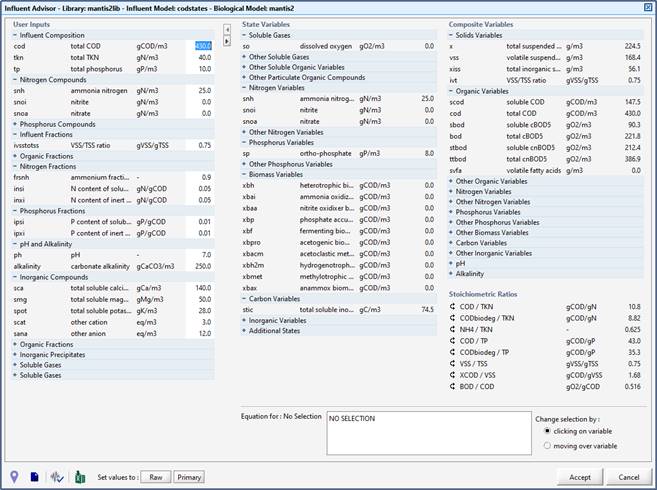
Figure 3‑1 – Influent Advisor Example
The User Inputs column on the left contains the variables that can be directly modified by the user to characterize a given influent stream for the selected influent model.
The middle State Variables column contains a summary of the calculated states variables based on the concentrations and stoichiometry that have been entered in the left-hand column.
The third column located on the right lists the Composite Variables that have been calculated based on the specified user inputs and state variables. As the data is entered into the User Inputs column, the state and composite variable values are automatically updated accordingly.
To see how a value is calculated, click on it. The formula will be displayed in the ‘Equation for’ box at the bottom of the screen, and the values used in the equation will be highlighted in the columns so that the applicable cells can be easily identified. If a negative value is calculated in either column, the number will turn red for easy identification. (Figure 3‑2). Correcting problematic data is a matter of adjusting parameters in the User Inputs column to achieve non-negative values.
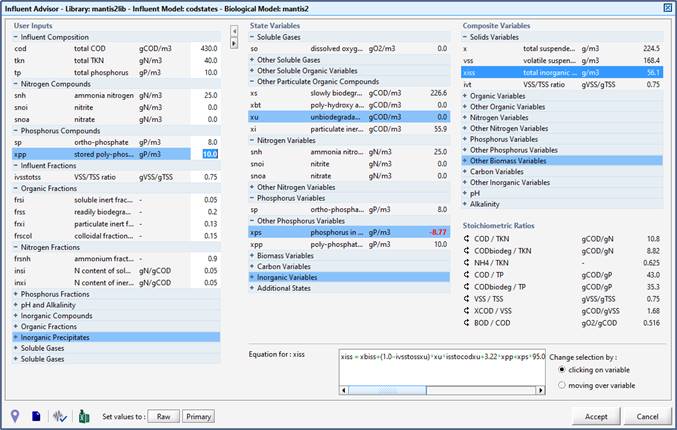
Figure 3‑2 – Influent Advisor showing Highlighted Cells (Blue) and Negative Value Errors (Red)
The influent models used in GPS-X make certain assumptions about what data may or may not be available. For instance, no influent model uses both COD and BOD data, even though the data may be available and may provide important information about how that organic material is partitioned into the available state variables.
Influent Advisor helps overcome this shortcoming.
Take an example in which BOD and COD data is available and the codstates model is chosen for the influent object and the User Inputs cells can be filled in, including the available COD data. The user can then scroll to the right table and check the BOD values calculated based on the input data. If the BOD data is in agreement with the measured BOD data (assuming no negative values appear in any cells), then the user can be assured that the input data is consistent with the available data. If the BOD data is different from the measured BOD, then the unknown (or estimated) input data should be adjusted until acceptable agreement is achieved.