CHAPTER 13
The GPS-X On-line Data Reading Tools are very powerful tools that are relatively easy to configure. In normal “off-line” mode, input data files are read only once at the start of a simulation. This requires the user to wait until all the data that will be used in the simulation is collected, convert them manually to GPS-X .dat files, and then do the simulation runs.
Continuous Reading of Text Files
In on-line mode these .dat files are growing continuously, line by line, and GPS-X keeps monitoring and reading them at a specified sampling rate. If a new line appears in the data file, it will be brought into GPS-X (the file input controller updated or the data appears as a new point on the graph) and the simulation advances to the new time. Thus, the simulation would be continuously updated with data arriving in real time from a plant SCADA system, and real time simulation of the plant would be achieved.
The user would see a data/model difference from the very moment it starts to emerge, indicating a problem. An additional tool called "sigtrack", found in the toolbox object, could be used to set up alarms if the data, simulation, or the error between them goes beyond certain limits.
An advanced on-line application (which would require the Dynamic Parameter Estimator, DPE) can do a real-time simulation and calibration/optimization simultaneously. In this way, the model calibration would be automated using the most up to date plant data.
To access the On-Line settings, select Layout > General Data > System > Input Parameters > Simulation Tool Settings.
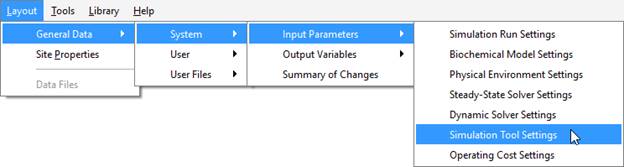
Figure 13‑1 – Accessing On-line Operation Settings
Scroll down to the On-line Operation section. This is where you can turn on/off the on-line run mode (ie. continuous data reading and automatic simulation until the last point) and access additional settings under the More button.
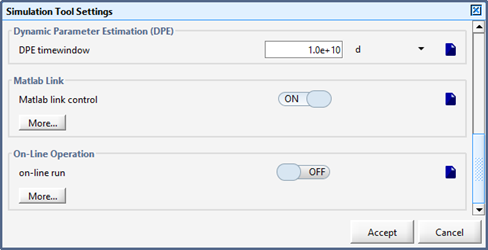
Figure 13‑2 – Simulation Tool Dialog
The main on-line operation parameters include:
· wait for all data to synchronize: It is possible that not all data is coming in at the same rate. If ON, all the variables on file input controllers must have data before the simulation will continue. This is meant to deal with small discrepancies in instrument logging frequencies.
· waiting period: The simulation will pause while it waits for data to accumulate in the input data file from the source (i.e. SCADA system). It will then continue only after data arrives that corresponds to at least the current simulation time plus the specified waiting period.
· sampling rate from data base: The file system is checked for new data at the specified rate. The default rate is 60 seconds.
Input data files are typically created by ‘bridge’ software that converts data from a format in a SCADA system to the format used by GPS-X. The format of online input data files is the same as the standard GPS-X input data files. For a complete explanation of the format see Using File Input Controllers in Chapter 6.
In on-line mode, it is possible to run multiple simulations concurrently and transfer data between simulations where the output from one layout is used as input file to another. (i.e. one layout optimizes settling, and then the next one uses optimized settling parameters). Typically, GPS-X reads data files with the naming convention <layoutname>_<>_<date>.dat and produces output files with <layoutname>_<>_<date>.out. To be able to use files generated by other layouts, GPS-X provides a way to specify non-default named files.
The user can enter the name of the layout that generates the .out file in the text field next to the plant #1 name (for data file) label. Click on More… to be able to add up to 10 file names. The layout would have to be rebuilt once the file names are entered (i.e. plant file names cannot be specified in a scenario).
One application of this functionality is to use a previously calibrated layout of a particular plant to generate real-time data that would otherwise be generated and read in from a real plant SCADA system. For example, if the previously calibrated layout name is realplant.lyt, then the plant #1 (for data file) field would be specified as realplant. The data generated by this realplant layout is then read in by a second layout running in a separate application of GPS-X according to the On-Line Operation settings in the second layout. In this way the user can simulate the on-line operation of GPS-X without having access to an actual SCADA system. The second layout will ignore any data files which are created after the simulation begins. Therefore, empty data files may need to be created prior to starting the online simulation to ensure that data is monitored and read in from the appropriate files.